A record of every agent call
Every call an agent makes through Toolspoke writes a row: the person behind the key, the arguments that went out, the result that came back, and where the time went.
- toolName
- github__create_issue
- agentName
- claude-desktop
- userId
- usr_8f2c41a0
- status
- success
- executionPath
- direct
- durationMs
- 812
More than a dozen further fields are recorded on the same row.
Every call, in one place
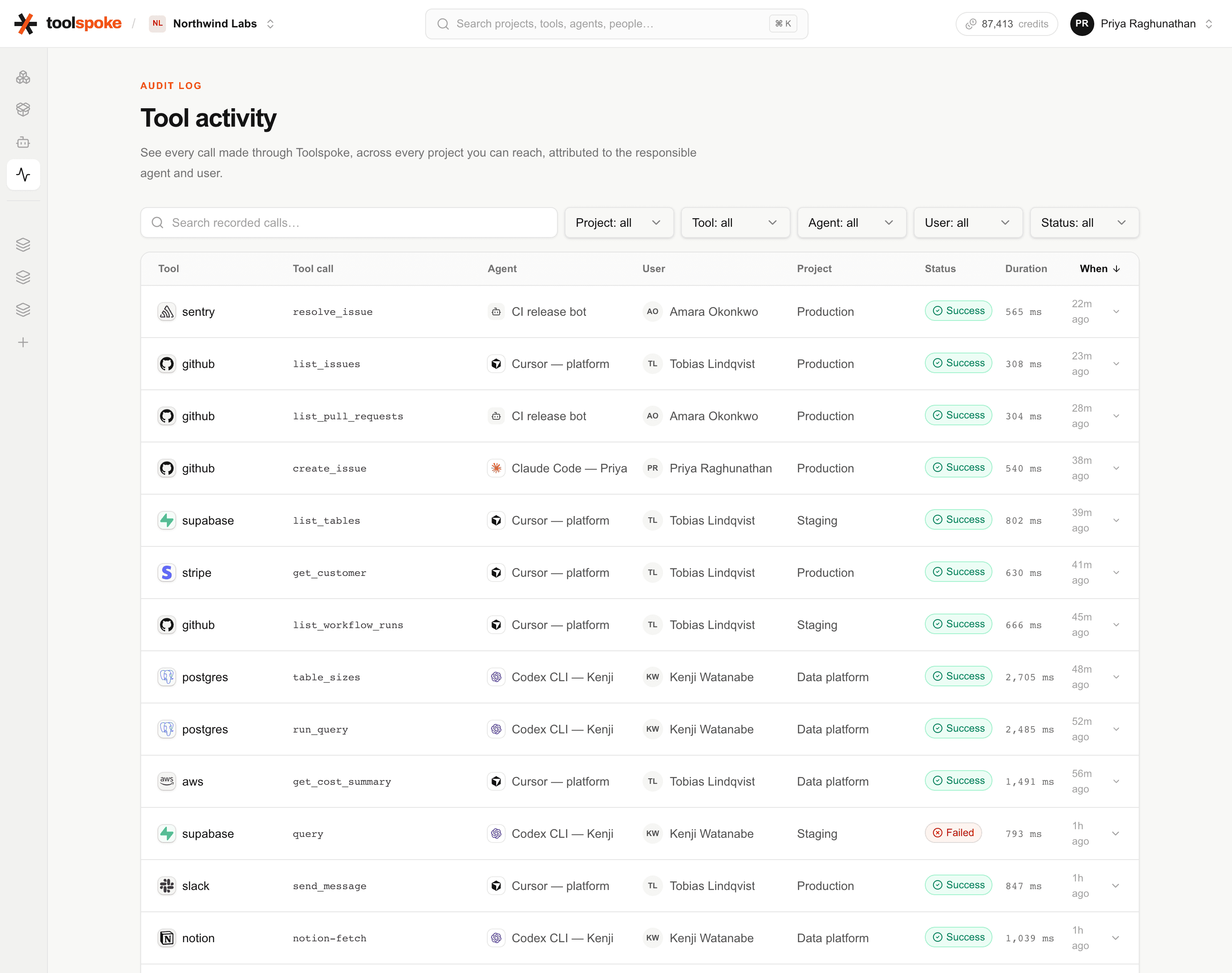
The activity feed lists calls newest first, with the tool, the agent, the person, the project, the status and how long it took. Filter it by any of those.
What one row holds
Not a summary written after the fact. The row is written by the code path that made the call, at the moment it finished.
Who made the call
An agent key belongs to a member of the workspace, so a call arrives attached to a person rather than to a shared secret. The client's own name travels with it, which is how you tell one person's Claude Desktop from the same person's CI job.
- organizationId
- projectId
- userId
- agentKeyId
- agentName
What was called, and what came back
The tool name recorded is the underlying action, never the wrapper the client went through. A year later the record still reads as something that happened. Arguments are kept, the result is kept unless the connector says otherwise, and a failure keeps its error message.
- toolName
- input
- output
- outputWithheld
- status
- error
Where it ran and where the time went
A slow call is usually slow for a reason you can name: it waited in the queue, it waited for a container to boot, or the provider itself was slow. The three are recorded separately so you can tell which, instead of arguing about one total.
- executionPath
- sandboxId
- executionId
- queueDurationMs
- startupDurationMs
- providerDurationMs
- durationMs
What is left out
A log that keeps everything is a second copy of your inbox. A connector can declare that an action’s result must not be retained, and when it does the payload is never written at all rather than written and later cleaned up. The row records that the output was withheld, so a gap in the log is visible as a decision instead of looking like data loss.
Credentials are not part of a call’s arguments in the first place. They are decrypted from the credential store inside the gateway and attached to the outbound request, so they never pass through the client and never reach the log by the ordinary route.
Results a connector marks as sensitive
Declared per action. Message bodies and thread contents on mail connectors are the usual case. The call is still logged; only the payload is absent.
Secrets that turn up in an argument anyway
Values under keys such as authorization, cookie, password, token, api key and private key are masked, along with bearer tokens found inside text.
Catalog lookups
Searching for a tool, listing toolkits and reading a guide write no row and cost no credit. Only calls that reach a provider are recorded.
Health checks
Recorded but flagged, and kept out of the activity feed, so an automated probe every few minutes does not bury the calls people actually made.
![An expanded audit row for an aws invoke call: the request parameters show an api_key argument printed as [REDACTED], beside the response payload, with a Harborbox sandbox badge and the queued, startup and provider timings.](/_next/image?url=%2Fscreenshots%2Faudit-detail-redacted.png&w=3840&q=75)
What the log does not do
Arguments are always kept
Output can be withheld per action. Input cannot. If an argument would carry something you cannot keep, that belongs in the credential store rather than in the call.
Two kinds of masking
A connector can name arguments to withhold, and those never reach the database. Everything else is masked by key name when a record is served, which is a safety net over the stored row rather than a guarantee about what it contains.
Retention is a window, not erasure
A retention period is set per workspace and older rows are removed wholesale. There is no screen for it yet: it is a column an operator sets in the database. There is no per-person deletion either, and a workspace with no window set keeps its log indefinitely.
See what your agents did
Start with one seat and 5,000 credits. The audit log is on from the first call, on every plan, including the free one.